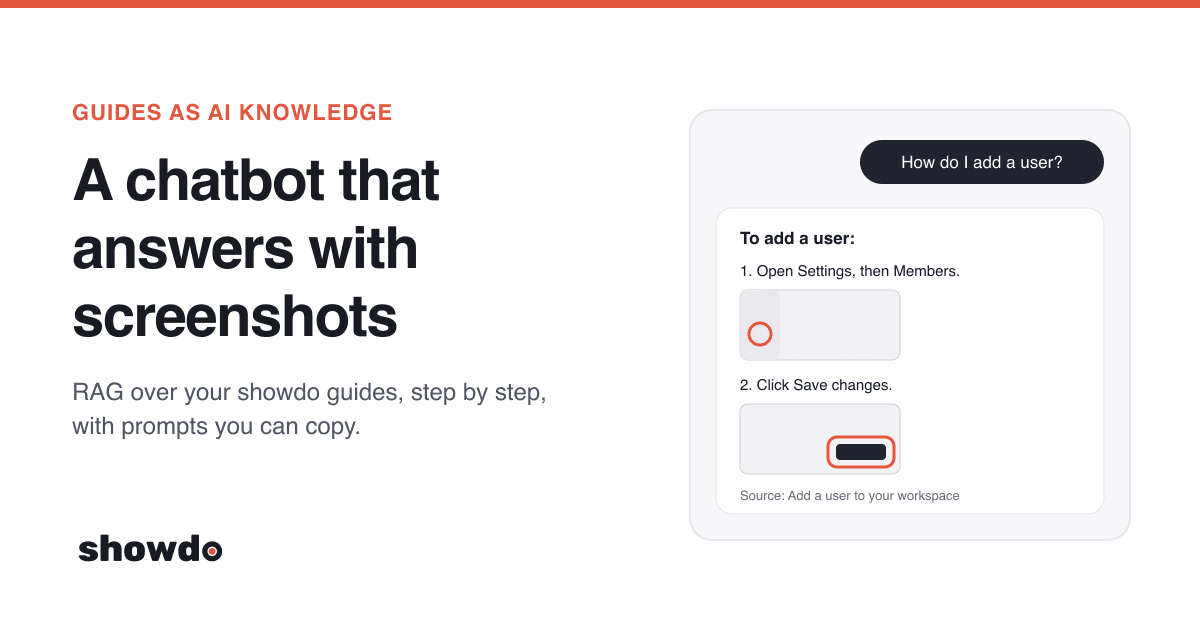
Most help chatbots answer "how do I...?" questions with a wall of text. People then go looking for the button the text describes. Your showdo guides already hold the better answer: every step has its words, its screenshot and the exact spot to click.
This post shows how to make your guides the source documents for a chatbot or AI assistant, so it answers from your real steps and shows the real screenshots. There is a no-code path that takes a few minutes and a developer path that builds a small RAG (retrieval-augmented generation) system. Every prompt below has a Copy button: paste it into Claude, Claude Code or another AI coding tool and it does the work.
Tip: Want it built for you? Jump to the one prompt that writes the whole thing: the sync, the search, the answers and a small chat page. Paste it into Claude Code in an empty folder and it does the rest.
Why guides make good AI knowledge
RAG works best when the documents are short, clear and about one thing each. A showdo guide is already shaped that way.
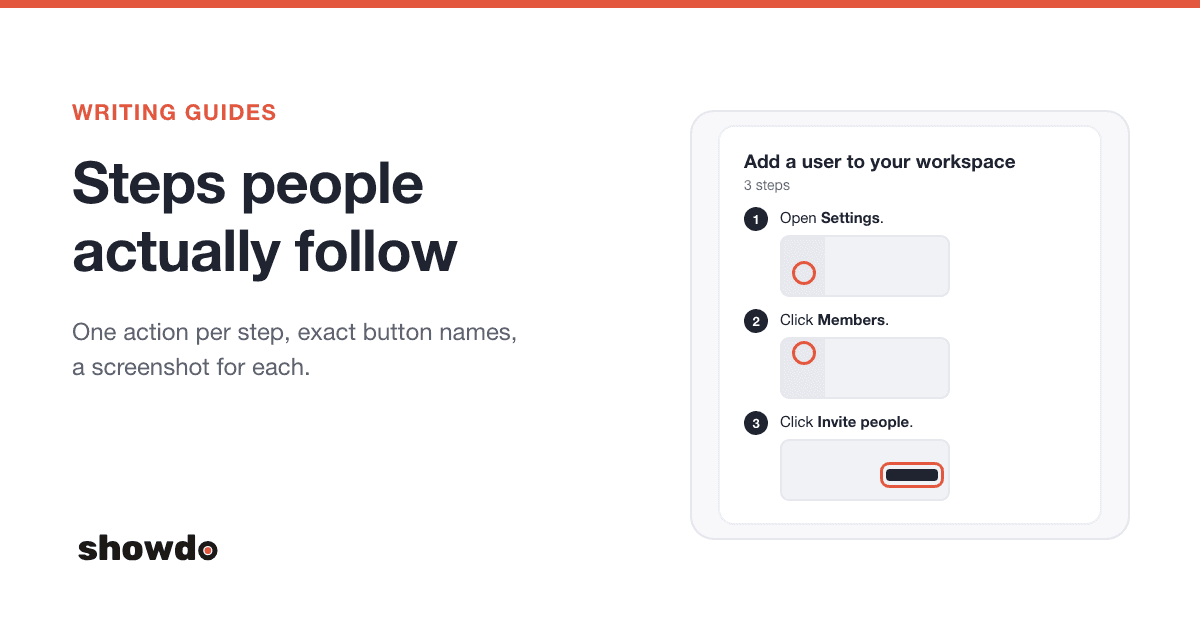
- Already split into steps. Each step is one action on one screen. That is exactly the size of piece a search index wants.
- Words and pictures that match. The step text says "Click Save changes" and the screenshot shows that button, with where it was clicked.
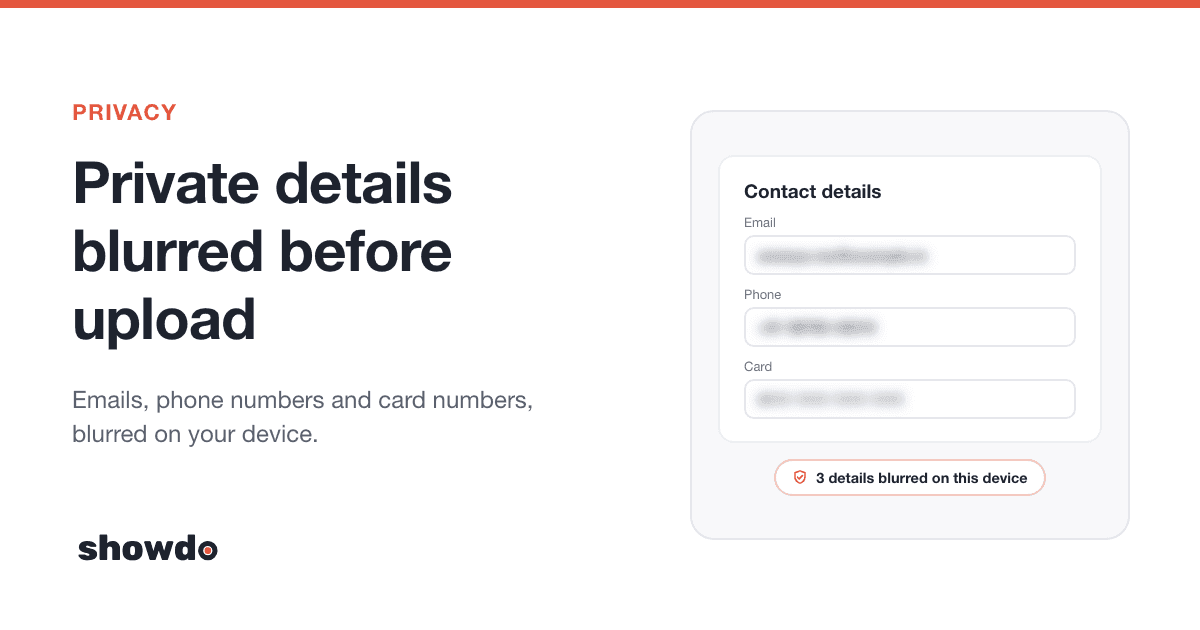
- Private details already hidden. Screenshots are blurred before they leave the device, so the copies your assistant keeps are the blurred ones.
- Easy to keep current. When a screen changes, record the task again. The next sync picks it up.
- More than one language. Guides can be written or translated into 60 languages, including the 22 scheduled languages of India. Each translation is its own guide, so your assistant can answer from the Hindi or Tamil version too.
Pick your path
| Markdown export | Your own RAG (API) | Claude with a showdo tool (MCP) | |
|---|---|---|---|
| Code needed | None | A small project, written for you by the prompt below | A small tool, written for you by the prompt below |
| Where answers show up | Any chatbot that accepts Markdown files | Your app, help widget or internal tool | Claude Desktop or Claude Code |
| Screenshots in answers | Links to them, when the chatbot shows Markdown images | Yes, inline under each step | Claude sees them and can describe them |
| Stays up to date | Export again after changes | Automatic, every sync | Always live |
Start with the Markdown export if you want something working today. Build the RAG when you want answers with pictures inside your own product.
Path 1: Markdown export into any chatbot
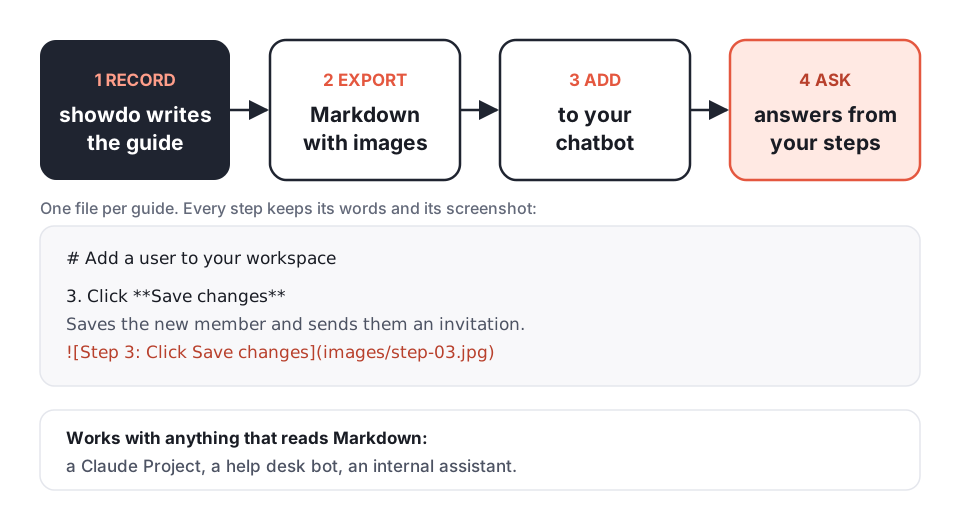
- Export the guides. In your library, select the guides you want (up to 50 at a time), click the download button and choose Markdown with images (.zip). You get one folder per guide, each with a guide.md and its screenshots. For a single guide, open it and choose Export, then Markdown with images.
- Add the files to your chatbot. Upload the guide.md files wherever your chatbot keeps its knowledge: a Claude Project's knowledge, your help desk bot's sources, or an internal assistant.
- Give it instructions. Paste the prompt below into the chatbot's instructions (in a Claude Project, that is Project instructions).
Each step in the file looks like this, with the screenshot right under its words:
3. Click **Save changes**
Saves the new member and sends them an invitation.
When a guide is published and shared by link, the Markdown export can point its screenshots at copies showdo hosts instead of files in the zip. Chatbots that show Markdown images can then show the screenshot in their answer. Chatbots that only read text still answer from your exact steps.
The instructions prompt (paste it into the chatbot's instructions):
You answer "how do I" questions for our team using ONLY the guides in your knowledge.
Each guide is a Markdown file made by showdo: a title, a short summary, then numbered
steps. A step can have a screenshot line like .
How to answer:
1. Find the guide that matches the question. If two guides could fit, ask which one
the person means, naming both titles.
2. Reply with the steps from that guide, in order, in short numbered lines. Keep the
wording of buttons and menus exactly as the guide writes them (often in **bold**).
3. If a step has a screenshot line and you can show Markdown images, copy that line
unchanged under the step. Never make up an image link or change one.
4. End with: "Source: <guide title>".
5. If no guide covers the question, say so in one sentence and suggest who to ask.
Do not guess steps from general knowledge.
6. Answer in the language the person writes in. If a guide exists in that language,
use it.Tip: Re-export after you change or add guides, and replace the old files. A shared link that you reset in showdo stops old screenshot links from working, so export again after a reset too.
Path 2: your own RAG that answers with screenshots
This is the architecture. It has two halves: a sync that copies your guides in, and an answer flow that runs for every question.
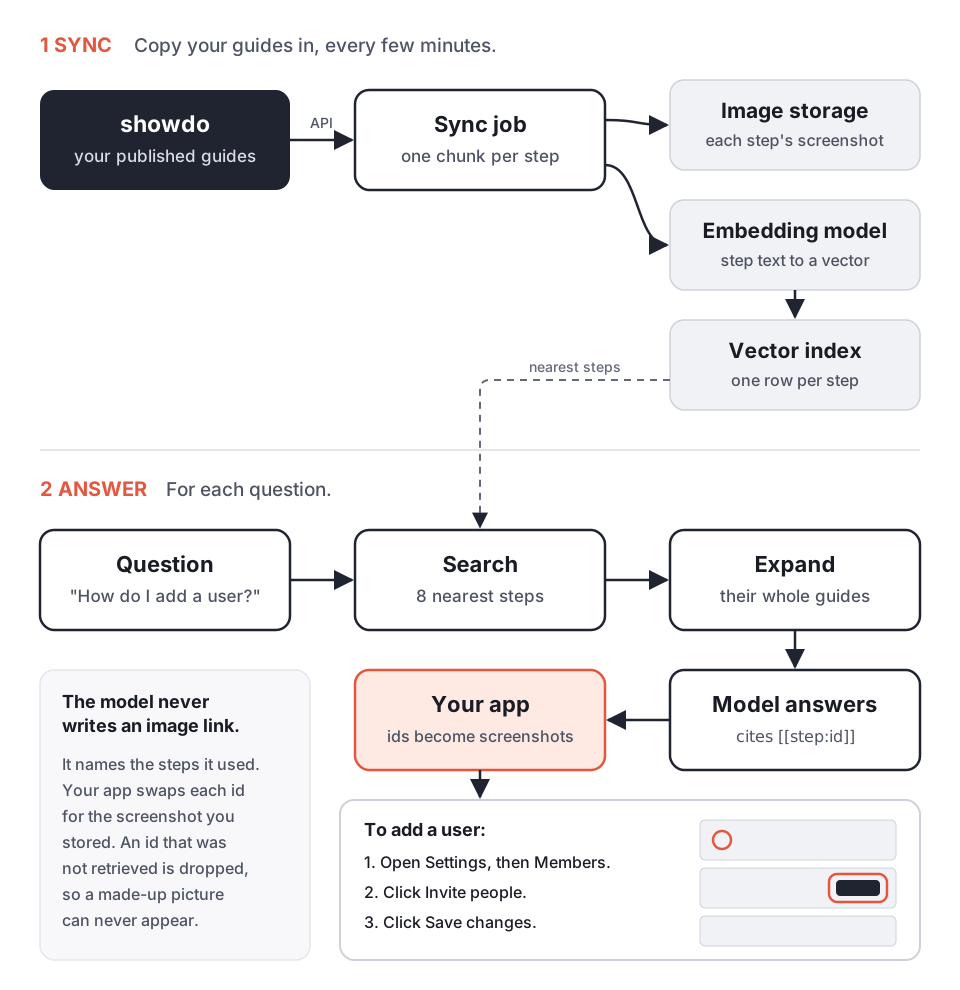
The one idea that makes it work: the model never writes an image link. It names the steps it used, and your code swaps each name for the screenshot you stored. That way the picture under "Click Save changes" is always the real screenshot of that step, and a made-up picture cannot appear.
Step 1: Create a read-only access key
In showdo, open Settings, then Connected apps, and click Create access key. Give it a name like "Help bot", tick only View guides, and copy the key. It starts with sdo_ and is shown once.
Keep it on your server, as a secret, never in a web page. Every field and error code is in the API reference. The key can read everything its owner can read in the workspace, including guides meant only for your team (see Keep it safe).
Step 2: Sync your guides
Two read-only calls give you everything:
GET /api/v1/guides?limit=100&offset=0
Authorization: Bearer sdo_...
returns { guides, total }, most recently updated first. Ask again with offset=100, offset=200 and so on until you reach total. Then for each guide:
GET /api/v1/guides/<id>
Authorization: Bearer sdo_...
returns { guide, steps }. Steps come in order. Each one has an id, index, kind, title, description, the url and pageTitle of the screen, the element that was clicked, bounds (where it is, as fractions of the screenshot) and an imageUrl.
Download each screenshot during the sync. The imageUrl is a signed link that works for one hour, so save the file in your own storage (a folder, S3, R2) under the step's id. The blur is already applied. Skip guides whose updatedAt has not changed since the last sync, and delete guides that are no longer in the list.
Here is the core of a sync in TypeScript:
const SHOWDO = process.env.SHOWDO_URL!; // the address you open showdo at
const headers = { Authorization: `Bearer ${process.env.SHOWDO_API_KEY}` };

async function* allGuides() {
  for (let offset = 0; ; offset += 100) {
    const res = await fetch(`${SHOWDO}/api/v1/guides?limit=100&offset=${offset}`, { headers });
    const { guides, total } = await res.json();
    yield* guides;
    if (!guides.length || offset + guides.length >= total) return;
  }
}

for await (const g of allGuides()) {
  if (alreadySynced(g.id, g.updatedAt)) continue;
  const { guide, steps } = await (await fetch(`${SHOWDO}/api/v1/guides/${g.id}`, { headers })).json();
  for (const step of steps) {
    if (step.imageUrl) {
      const img = await fetch(new URL(step.imageUrl, SHOWDO)); // the link can be relative
      await saveImage(step.id, Buffer.from(await img.arrayBuffer()));
    }
  }
  await indexGuide(guide, steps); // Step 3
}alreadySynced, saveImage and indexGuide are yours to write (the full prompt below writes them for you).
Step 3: One chunk per step
Make each step its own chunk. Embed a short text that gives the step its context, and keep the details you need for the answer next to it.
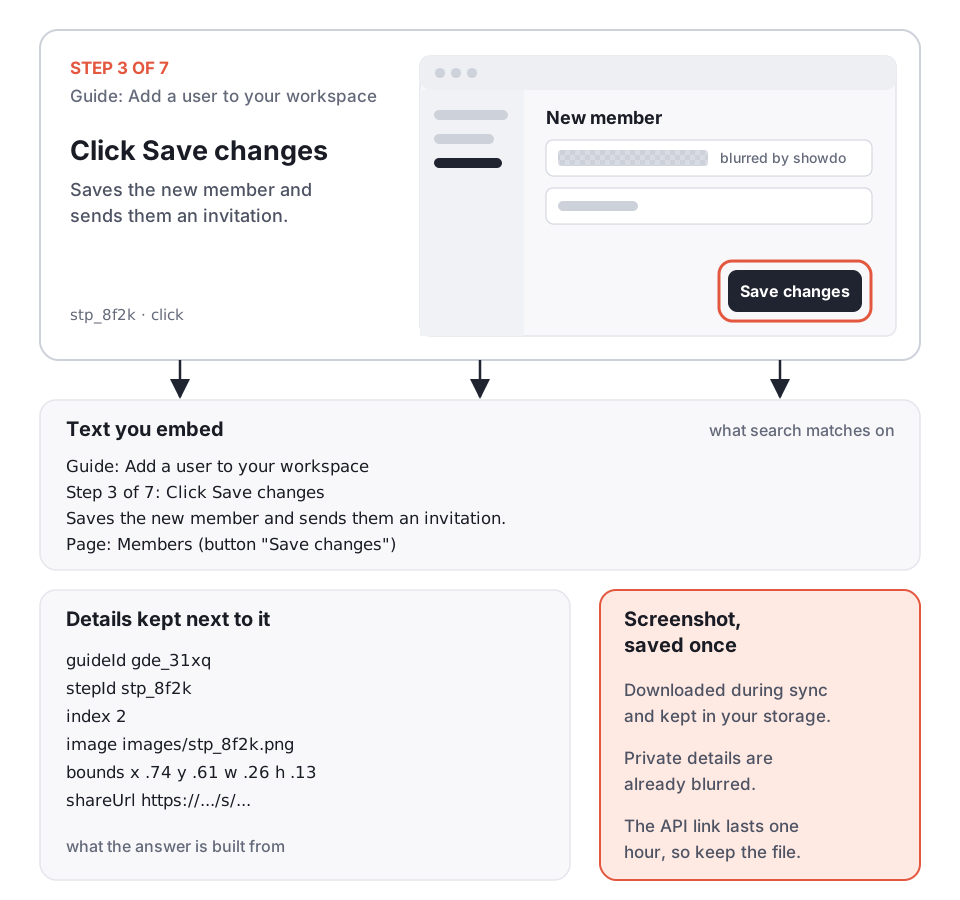
The text to embed, for each step:
Guide: <guide title>
Step <n> of <total>: <step title>
<step description>
Page: <pageTitle> (<element.role> "<element.label>")
Include the guide title in every chunk. "Click Save changes" alone matches hundreds of questions; "Add a user to your workspace, Step 3: Click Save changes" matches the right one. Notes (kind "note") are tips and warnings from the author: index their body too, without an image.
Any embedding model works. Store the vectors wherever you already keep data: Postgres with pgvector, SQLite, or a hosted vector database.
Step 4: Search steps, answer with whole guides
When a question comes in:
- Embed the question and find the 8 nearest steps.
- Group them by guide and keep the best 2 or 3 guides.
- Load every step of those guides, in order. A single matching step is rarely the whole answer: "Click Save changes" only makes sense after "Open Members".
Search finds the right place; the whole guide gives the model the full set of steps around it.
Step 5: Ask the model to cite step ids
Send the guides to the model with each step labelled by its id, and ask it to cite those ids. This is the system prompt (copy it as is):
You are the help assistant for our product. Answer only from the GUIDES below.

GUIDES are written by showdo. Each guide has an id and a title, then its steps in
order. Each step starts with its id in this form: [[step:STEP_ID]].

Rules:
1. Answer with the steps the person needs, as a short numbered list, in the order the
   guide gives them. Keep button and menu names exactly as written.
2. After each step you used, add its id on its own line, exactly as given:
   [[step:STEP_ID]]. Only use ids that appear in GUIDES. Never invent or change an id.
   Never write an image link or a URL yourself.
3. End with one line: Source: [[guide:GUIDE_ID]] for each guide you used.
4. If the guides do not answer the question, say so in one sentence. Do not guess.
5. Answer in the language of the question.

GUIDES:
{{guides}}
And the {{guides}} block is built like this:
[[guide:gde_31xq]] Add a user to your workspace
[[step:stp_3m1a]] 1. Open Settings, then Members.
[[step:stp_5c9d]] 2. Click Invite people.
[[step:stp_8f2k]] 3. Click Save changes. Saves the new member and sends them an invitation.
Step 6: Swap the ids for screenshots
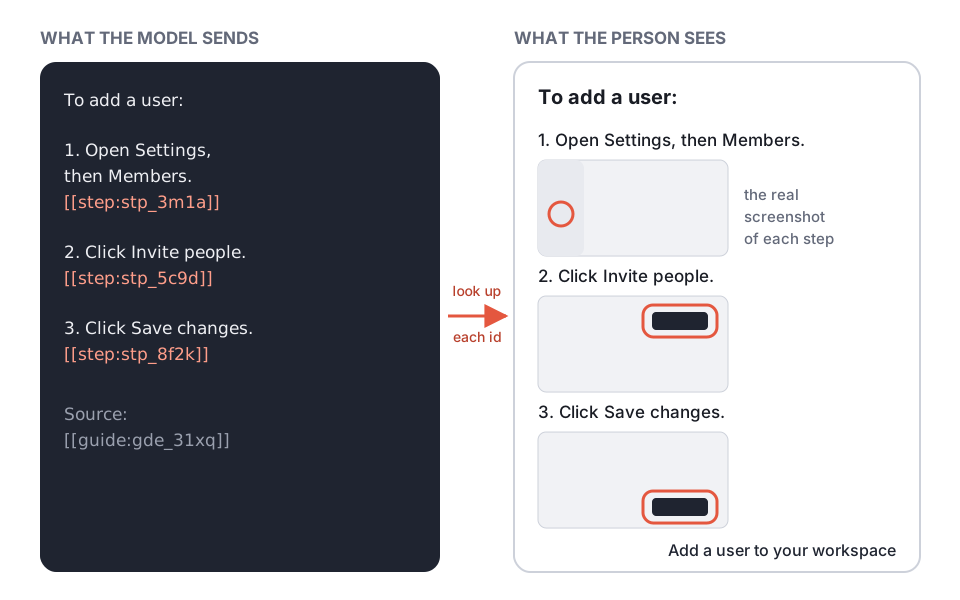
Before you show the answer, replace each [[step:...]] with that step's screenshot, and each [[guide:...]] with a link to the guide. Drop any id that was not in the guides you sent:
function render(answer: string, steps: Map<string, Step>, guides: Map<string, Guide>) {
return answer
.replace(/\[\[step:([\w-]+)\]\]/g, (_, id) => {
const s = steps.get(id);
return s?.image ? `` : "";
})
.replace(/\[\[guide:([\w-]+)\]\]/g, (_, id) => {
const g = guides.get(id);
return g ? `[${g.title}](${g.shareUrl ?? g.appUrl})` : "";
});
}steps and guides hold only what you sent to the model for this question. That is what makes an invented id harmless: it simply disappears.
Tip: Each step also has bounds, the box around what was clicked as fractions of the screenshot. Use it to crop the picture around the button, or to draw your own highlight.
Build the whole thing with one prompt
Paste this into Claude Code (or another AI coding tool) in an empty folder. It builds the sync, the index, the answer flow and a small chat page. Change the first line if you prefer Python or a different database.
Build a small RAG service that answers "how do I" questions from our showdo guides
and shows each step's real screenshot in the answer.
Stack: TypeScript on Node 20+, no framework. SQLite (better-sqlite3) for guides, steps
and embeddings (store vectors as Float32 blobs, cosine similarity in code). Images in
./data/images. Keep it small and readable, with a README.
Settings (.env, add a .env.example, never log secrets):
- SHOWDO_URL: our showdo address, e.g. https://showdo.example.com
- SHOWDO_API_KEY: an access key starting with sdo_ (only "View guides" ticked)
- SYNC_VISIBILITY: comma list of guide visibilities to include, default "org,link,public".
For a public-facing bot we set it to "link,public".
- EMBEDDINGS_URL, EMBEDDINGS_API_KEY, EMBEDDINGS_MODEL: any OpenAI-compatible
/v1/embeddings endpoint (body {model, input}, response data[].embedding).
- ANTHROPIC_API_KEY and ANSWER_MODEL (default claude-sonnet-5-5) for answers, using
the Anthropic Messages API.
showdo API (read-only, header "Authorization: Bearer <SHOWDO_API_KEY>"):
- GET {SHOWDO_URL}/api/v1/guides?limit=100&offset=N returns {guides, total}, most
recently updated first. Page with offset until offset >= total. Each guide has id,
title, summary, language, status, visibility, stepCount, updatedAt, appUrl, shareUrl.
- GET {SHOWDO_URL}/api/v1/guides/{id} returns {guide, steps}. Steps are in order. Each
step: id, index, kind (click, type, key, navigate, select, scroll, screenshot, note),
title, description, body (notes only), variant (notes: tip, alert, info, header),
url, pageTitle, element {role, label}, bounds {x,y,w,h as 0..1 fractions}, imageUrl,
imageWidth, imageHeight.
- imageUrl is a signed link valid for ONE HOUR and may be relative: resolve it with
new URL(imageUrl, SHOWDO_URL) and download it during the sync. Save it as
./data/images/{stepId}.{ext from content-type}. The privacy blur is already applied.
- 401 means a bad or expired key: stop and say so. Retry 429 and 5xx with backoff.
1. `npm run sync`:
- List all guides (paged), keep those whose visibility is in SYNC_VISIBILITY.
- Skip a guide whose updatedAt matches what is stored. Otherwise fetch it, download
its step images, replace its steps and their embeddings in one transaction.
- Delete guides (and their images and vectors) that are no longer listed.
- One chunk per step. Embed this text:
Guide: {guide title}
Step {n} of {total}: {step title}
{step description, or note body}
Page: {pageTitle} ({element.role} "{element.label}")
Skip lines that would be empty. Header notes (variant "header") are section
titles: prefix the following steps' text with them instead of indexing them alone.
- Print a short summary: guides added, updated, removed, steps indexed.
2. `npm run ask -- "question"` and POST /ask {question} on `npm run serve` (port 8787):
- Embed the question, take the 8 nearest steps, group by guide, keep the best 3
guides, load all of their steps in order (at most 60 steps in total).
- Build a GUIDES block: a line "[[guide:ID]] Title" per guide, then one line per step
"[[step:ID]] n. title. description".
- Call the model with this system prompt, with {{guides}} replaced:
"""
You are the help assistant for our product. Answer only from the GUIDES below.
GUIDES are written by showdo. Each guide has an id and a title, then its steps in
order. Each step starts with its id in this form: [[step:STEP_ID]].
Rules:
1. Answer with the steps the person needs, as a short numbered list, in the order
the guide gives them. Keep button and menu names exactly as written.
2. After each step you used, add its id on its own line, exactly as given:
[[step:STEP_ID]]. Only use ids that appear in GUIDES. Never invent or change an
id. Never write an image link or a URL yourself.
3. End with one line: Source: [[guide:GUIDE_ID]] for each guide you used.
4. If the guides do not answer the question, say so in one sentence. Do not guess.
5. Answer in the language of the question.
GUIDES:
{{guides}}
"""
- Post-process: replace [[step:ID]] with a Markdown image
 and [[guide:ID]] with a link to its shareUrl (or
appUrl). Remove any id that was not in the GUIDES you sent.
- Return {answer (Markdown), sources: [{guideId, title, url, stepIds}]}.
3. `npm run serve` also serves:
- GET /images/:file from ./data/images (only files that exist, no path tricks).
- GET / : one plain HTML chat page that posts to /ask and renders the Markdown,
with images at most 640px wide.
4. Tests (node:test) with a fake showdo API: paging, skipping unchanged guides,
deleting removed guides, relative imageUrl, and that an invented step id in a model
answer is removed.
When done, run the tests, then tell me the exact commands to run the first sync and
ask a question.Bonus: let Claude search your guides directly
If your team already works in Claude Desktop or Claude Code, you can skip the vector database. showdo can search your guides itself (GET /api/v1/guides?q=...), so a small MCP server with two tools is enough. Claude calls them while it answers and sees the screenshots.
Build an MCP server (TypeScript, @modelcontextprotocol/sdk, stdio transport) that
gives Claude read-only access to our showdo guides.

Settings from environment variables: SHOWDO_URL (our showdo address) and
SHOWDO_API_KEY (an sdo_ access key with only "View guides"). Send
"Authorization: Bearer <SHOWDO_API_KEY>" on every request. Never print the key.

Tools:
1. search_guides({ query: string, limit?: number = 5 })
   GET {SHOWDO_URL}/api/v1/guides?q=<query>&limit=<limit>
   Return a short text list: id, title, summary, stepCount, shareUrl or appUrl.
2. get_guide({ id: string, with_images?: boolean = true, max_images?: number = 8 })
   GET {SHOWDO_URL}/api/v1/guides/{id} returns {guide, steps}.
   Return one text block with the title, summary and every step in order
   ("n. title. description", notes as "Note: body"). If with_images, for the first
   max_images steps that have an imageUrl, fetch new URL(imageUrl, SHOWDO_URL) (a
   signed link valid for one hour) and add it as MCP image content right after that
   step's text, resized so the longest side is at most 1280px.

Tool descriptions should tell Claude: search first, then open the best guide, answer
with the guide's steps in order, keep button names exactly as written, and say which
guide the answer came from.

Add a README with the build command and how to add it to Claude Code:
claude mcp add showdo -e SHOWDO_URL=... -e SHOWDO_API_KEY=... -- node /path/to/dist/index.js
and to Claude Desktop (the mcpServers entry in its config file).Keep it safe
- Use a read-only key. Tick only View guides. Keep it on the server, never in a browser or a mobile app.
- Choose what goes in. The key can read every published guide in the workspace, including ones open to your team only. For a bot that customers use, sync only guides with visibility "link" or "public" (the full prompt has a setting for it).
- Keep the blurred copies. The screenshots the API gives you are already blurred. Do not replace them with screenshots from anywhere else.
- Remove what showdo removes. Delete guides from your index when they disappear from the list, so a guide you trashed stops showing up in answers.
- Keys that sit unused expire. An access key stops working after 180 days without use. If your sync starts getting 401, create a new key.
Questions
Do I need a vector database? Not always. For a few hundred guides, SQLite with vectors compared in code is plenty. The MCP path uses showdo's own search and needs none.
Which embedding model and which chat model? Any. The prompts above keep both as settings, so you can switch without changing code.
Can the assistant answer in Hindi or Tamil? Yes, if those guides exist. Translate a guide in showdo and the copy is synced like any other guide. The answer prompt tells the model to reply in the language of the question.
Does the model ever see private details? It sees the step text and, in the MCP path, the screenshots, both with private details hidden by showdo. Typed text that showdo hid comes back empty from the API.