The short version
- We are working towards the Web Content Accessibility Guidelines (WCAG) 2.2, level AA.
- You can use the showdo website with a keyboard, a screen reader and a small screen, in light or dark mode.
- Some parts, such as the picture editor and the video editor, are harder to use without a mouse.
- If something blocks you, tell us. We will help you and fix it.
The full text below is what counts.
Our goal
We want everyone to be able to use showdo, including people who use screen readers, keyboards, voice control, magnification or who have low vision, colour blindness, limited movement or other needs. Our target is WCAG 2.2 level AA. This is our goal, not a claim that every page meets it today.
What we do
On the showdo website and web app:
- Keyboard. Pages and menus are built to be used with the keyboard. A visible focus ring shows where you are. Pages have a "Skip to content" link.
- Structure. Pages use headings in order, landmarks and labels so screen readers can move around. Form fields have visible labels, and error messages are placed next to the field.
- Colour and contrast. Our colours were chosen to meet the AA contrast ratio in light and dark mode. Colour is not the only way we show something.
- Text size and screens. Pages work on small phone screens and when text is made larger.
- Motion. If your device asks for less motion, showdo reduces animation.
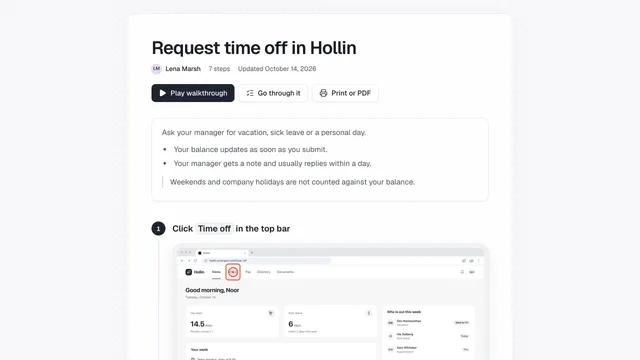
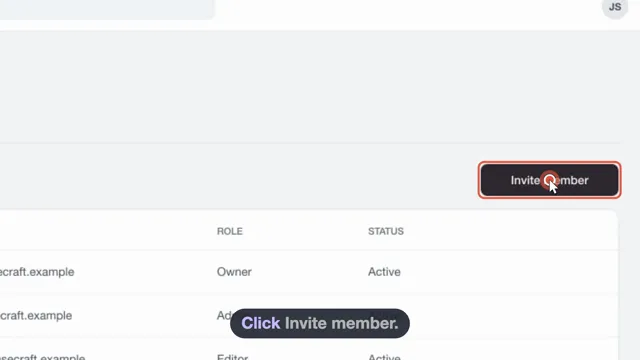
- Step screenshots have a text description that names the step, and every step also has written text, so a guide can be read without seeing the pictures.
Our legal pages also print cleanly, and each has a table of contents.
Known limits
We know about these limits today:
- Recording is visual. showdo for Chrome, showdo for Mac and showdo for Android record what you click or tap on a screen. They need you to be able to use the app or site you are recording. Screen-reader users may find recording hard.
- Picture editor and video editor. They use dragging, a timeline and a canvas. Some actions are hard to do with a keyboard alone, and we have not yet tested them with screen readers.
- Screenshots in guides. Screenshots show what was on the screen. A short description is given, but a screenshot can carry more detail than the text. Written steps are the main way to follow a guide.
- Apps and sites you record. showdo cannot make other companies' apps and sites accessible.
- Videos. Videos made by showdo have captions that follow the narration, and text versions of the steps exist in the guide.
- showdo for Mac and showdo for Chrome. They use standard controls where possible. We have not yet checked all of them against WCAG 2.2.
This statement describes our goal and what we know today. It is not an independent audit.
Tell us about a problem
If something on showdo is hard or impossible for you to use, please write to [email protected]. Say what you were trying to do, what got in the way, the page address, and the browser or device and any assistive tool you use. We will reply and tell you what we can do.
If you cannot use a guide, we can try to send it in another format. If you are not happy with our answer, you can contact the body in your country that deals with accessibility, such as the Equality and Human Rights Commission in Great Britain, or your national authority in the European Union.
Updates
We will update this statement when we improve things or learn about new limits. The date and version history are at the bottom of the page.
Version history
- Version 1.2Added showdo for Android to the apps this page covers. Nothing else changed.
- Version 1.1Relay is now called showdo, a product of WeMakeCode (OPC) Private Limited. Nothing else changed.
- Version 1.0First published version.